The hidden cost of AI-assisted development and vibe coding
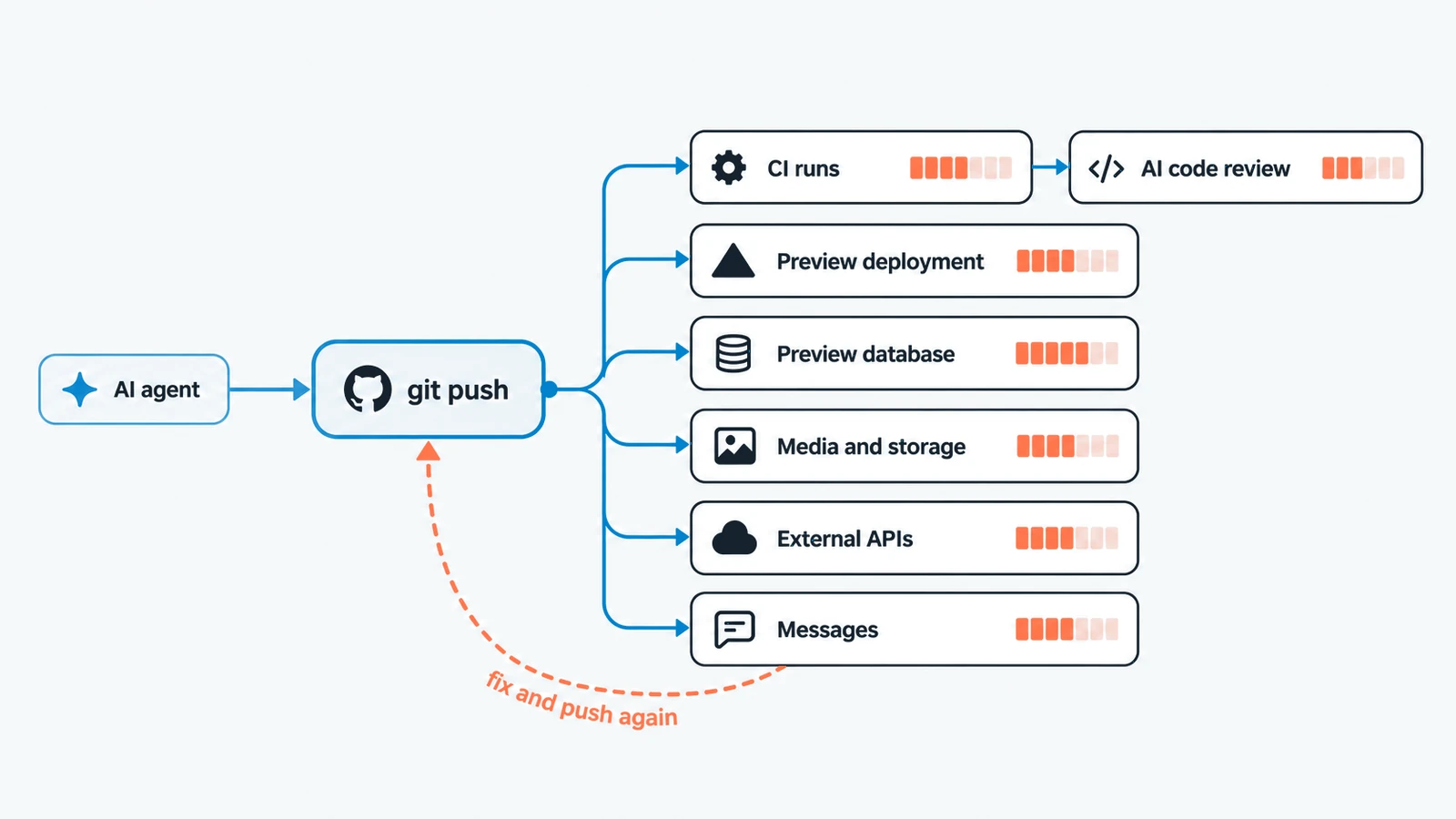
A few weeks ago, a new client forwarded me an email from GitHub telling them they'd used 100% of their Actions budget. They didn't know why, or what to do about it, so we went in and had a look. It isn't the first time a client has asked us to get involved in something like this.
The same pushes that had been running those workflows had also created 73 deployments on their hosting platform. Of those, 71 were ready and 2 had failed. Most were automatic preview deployments, created simply because branches had been pushed, and nobody had sat there pressing a deploy button 73 times.
One fast development loop was quietly telling several other systems to do work, and nobody noticed until the budget ran out.
We spend a lot of time looking at model subscriptions, tokens, credits and the price of coding agents, because those are the costs we can see. There's normally a usage screen or a bill attached to them. The hidden cost isn't necessarily the AI bill. It's the chain of systems the AI can set to work.
One action can become a lot of work
An AI coding agent doesn't work in isolation. Give it access to a repository and it may be able to create a branch, change files, commit, push and open a pull request, and each of those actions can trigger something else. A push can start several CI workflows. A preview environment can create database compute and storage. An integration test can call a real API, a document-processing test can ask another platform to do real production work, and a notification test can send a real message. Then the agent spots a problem, changes something and pushes again, and then again.
AI has reduced the cost of creating software much faster than it has reduced the cost of owning it.
Cheap development changes behaviour
The effort involved in making one more change has collapsed. A few years ago, if I wanted to explore 3 different implementations, there was enough work involved that I'd probably think about which one was worth trying first. With a capable coding agent, asking for another implementation, another test, another branch or another prototype can feel almost free. That's a big part of why these tools are worth using, and I don't want to lose it.
Vibe coding takes this to its natural end point. You describe what you want, look at what comes back and ask again if it isn't right, often without reading much of the code in between. Whether you call it that or something more respectable, the effect on the systems around it is the same. Lower friction changes behaviour, and the cost of generating code can fall while total spending on builds, deployments, infrastructure, APIs and review goes up. That isn't evidence that AI has failed. It might be evidence that it's become useful enough to change our behaviour faster than we've changed the systems around it.
Feeling faster isn't the same as creating more value
There's another problem with judging the economics by feel. AI often feels fast, and that isn't necessarily the same thing as producing useful work faster.
In 2025, METR ran a randomised trial with experienced open-source developers working in their own repositories. The developers expected AI tools to speed them up, and afterwards still believed they'd been about 20% faster, while the measured result was that their tasks took 19% longer. METR has since said those results are out of date for current tools, and when it tried to run the study again it hit a different problem: a lot of developers no longer wanted to do tasks without AI at all, which made a fair comparison very hard to get.
I'm not using that to argue that AI makes developers slower. My own experience would make that a fairly strange position to take, and the tools have moved on a long way since early 2025. What it does show is that perceived speed, measured time and useful value are 3 different measurements, and we should be careful about using the first as evidence for the other 2. If anything that's getting harder, because once a team won't work without these tools there isn't much left to compare against.
An agent can produce 20 commits instead of 2. That's definitely more activity, and it might be more useful work too, or we might just have made it much easier to produce activity.
Cheap code still has to be understood
There's another version of the same ownership problem in discussions around AI-assisted development: developers saying they struggle to understand code because AI wrote it. I've never found the authorship part especially convincing. Good programmers spend their careers reading code they didn't write. We inherit systems, join teams and work through libraries, frameworks, abstractions, old decisions, clever decisions and occasionally terrible decisions. Being able to follow unfamiliar code is part of the job.
That doesn't mean AI-generated code is automatically good. It can be repetitive, over-abstracted, inconsistent with the rest of the system or simply wrong, but those are code-quality problems, and "I didn't write it" is a separate one.
The risk I care about is cheaper code production letting a team build up more software than anybody is prepared to understand and own. If an agent produces a change, somebody still needs to be able to explain what it does, how it fits the system, what assumptions it makes and how they'd change it safely later. Tests, documentation and architecture all help, but none of them replaces engineers actually understanding the code. AI can reduce the effort of typing it. It can't remove the responsibility to understand the software you decide to keep.
The controls were designed around human-speed mistakes
Most development controls grew up around people. A developer changes some code, runs tests, pushes it, waits for CI, reviews the result, fixes something and tries again, and human time naturally limits how quickly that loop can run. Agents change the rate. If an agent can make 20 meaningful changes in the time a person used to make 2, letting the existing process run 10 times faster and assuming the economics still work isn't really an answer.
For software teams the response can be fairly mundane: decide which changes need remote CI, avoid preview deployments where they add nothing, keep production credentials out of ordinary development paths, put limits on automatic retries and clean up temporary environments when the work is finished. That's engineering the surrounding system for a different operating speed, and none of it needs to make the agent harder to use.
Who is accountable when the agent runs ahead?
You no longer necessarily tell an agent every step. You give it a goal and some tools, and it decides how many changes to make, how many times to retry and which permitted services to call. Nobody instructed that development process to deploy 73 times. It had been given a loop and the room to run it.
It's tempting to conclude that the AI and the human are now equal actors, and that's only half right. They're closer to equal in agency than they were, because the agent really does make decisions the person didn't spell out. They aren't equal in accountability. The agent has no stake, holds no account and can't answer for what it spent. When the work is done, it's still a person and a business that own the outcome, the bill and the explanation. Our client already owned the first 2. What they didn't have yet was the explanation, which is usually the point at which we get the call.
The person connecting the agent owns the boundaries it works inside. The tooling needs controls that can operate at the speed the agent moves, and we need enough evidence afterwards to understand what the agent actually did. Blaming the model alone lets the setup off the hook, and blaming the operator alone pretends the model's behaviour and the tooling played no part. Any honest account has to include all 3.
Capability and governance are different decisions
Connecting an agent to GitHub is a capability decision. Understanding everything a GitHub push can cause is a governance decision.
We tend to ask whether an agent can use a tool and whether that makes it more useful. Can it push code? Great. Can it deploy? Useful. Can it access a production database, process a PDF or send a test message? Potentially very useful. But the permission is only the beginning, and the questions behind it are less exciting. If an agent pushes this branch, what starts? If it retries this job 20 times, what does that use up? If it calls this endpoint, is it hitting a cheap test stub or a paid production service? If it creates something temporary, who removes it? If something loops for an hour, which control notices first? A budget warning that arrives tomorrow isn't much of a control against something that can spend money today.
Slowing down the right things
The obvious response would be more controls and more approval steps, and that can go wrong just as easily. If I have to approve every harmless file edit or local test, we've thrown away much of the value of using an agent. I use a fairly simple test for where friction belongs.
Is it expensive? Could this action create meaningful usage or third-party cost?
Is it irreversible? Could it delete, overwrite or materially alter something we can't easily recover?
Is it externally visible? Could it deploy, publish, email, message or otherwise affect somebody outside the development loop?
If the answer to any of those is yes, some form of limit, approval or stronger evidence probably makes sense. If all 3 are no, take away as much friction as you can. The point is to let agents move quickly where speed is cheap and reversible, and to add friction where their actions have real consequences.
A 15-minute exercise
Take 15 minutes and look at the systems your development agents touched in the last 24 hours. Look at CI runs and preview deployments, and follow what each workflow can trigger. Check whether external APIs are test or production services, which credentials the agent can reach, what your spending controls actually cover and how quickly you'd know if something started using money unexpectedly.
When we do this with clients, these are the ones that tend to get forgotten:
- AI code review. Since 1 June 2026, GitHub Copilot code review uses Actions minutes on private repositories as well as AI credits, so an agent opening pull requests quickly is also spending CI minutes on reviewing them.
- Preview databases. Supabase preview branches are full environments with their own compute, disk, egress and storage, and they aren't covered by the Spend Cap. Other platforms work in a similar way.
- Preview deployments. Every branch push can mean another build on the hosting platform, whether or not anyone ever opens the preview.
- Serverless databases. No server doesn't mean no meter. Rows read and written are still counted, so a test suite running real queries in a loop is still using something.
- Image and media processing. One "resize this" can turn into transformation, storage and bandwidth usage.
- Messaging. A notification test pointed at a real SMS, email or verification service sends real messages, and each one is counted.
- Specialist processing APIs. Document, PDF and AI services are often billed per page, per second or per call, so a test run is real paid work.
- Logging and monitoring. Error tracking and tracing are often priced by volume, and a noisy loop produces a lot of volume.
Then draw the chain. Start with the agent and follow every action it can take until you reach the final system that does work, spends money, changes something or reaches another person. You've just drawn your downstream cost graph.
I'm still very bullish about AI-assisted development. I use it and advise on it constantly, and a lot of what we do at Jawwws is helping businesses work out why an AI-assisted setup isn't behaving, taking apart implementations that were put together quickly and didn't hold up, and getting them working properly in the real world. The tools are improving remarkably quickly, which is exactly why the economics and controls around them need more attention. When the cost of trying something falls, we try more things. When agents get access to more tools, their decisions reach further. When they can act faster than billing systems, review processes and alerts were designed to follow, small mistakes get amplified too.
What helps is better feedback about what the work actually costs, clearer boundaries around actions with consequences, and a closer link between activity and useful outcomes. Before connecting an agent to the next tool, have a look at what sits behind it. You may find the AI subscription is the cheapest part of the system.
If you've had an email like the one our client forwarded, or you'd rather not draw that chain on your own, book a free 30-minute Google Meet with us. We'll look at what's behind it with you and tell you plainly what we find.